WLAN集中式转发

WLAN知识点

一、核心拓扑

1
2
3
[DHCP服务器][交换机] ←→ [AC]  

[FIT AP] → 无线终端(手机/电脑)
  • AP需通过有线连接到网络,与AC建立CAPWAP隧道。

二、配置关键步骤

  1. AC基础配置

    • 配置管理IP(如Vlanif接口)、启用CAPWAP。
    1
    [AC] capwap source interface Vlanif 100  # 指定AC的CAPWAP源接口
    • 下发AP的DHCP中的option 43
    1
    2
    option 43 hex 030A31302E31302E31302E31
    option 43 sub-option 3 ascii 10.10.10.1
  2. AP上线

    • AP通过DHCP获取IP,通过DHCP Option43或静态配置发现AC。
    • AC上注册AP(手动添加AP的MAC或序列号)。
    1
    2
    3
    [AC] wlan
    [AC-wlan] ap auth-mode mac-auth # 按MAC认证AP
    [AC-wlan] ap-id 1 ap-mac 00e0-fc12-3456 # 注册AP
  3. WLAN业务配置

    • 创建SSID(无线名称)、安全模板(如WPA2-PSK密码)。
    • 创建VAP模板(绑定SSID、安全模板、VLAN),下发到AP。
    1
    2
    3
    4
    5
    6
    7
    8
    9
    10
    11
    12
    13
    14
    15
    16
    17
    18
    19
    20
    21
    22
    23
    24
    [AC-wlan] ssid-profile name office-ssid  # 创建SSID
    [AC-wlan-ssid-office-ssid] ssid Office # 设置无线名称

    [AC-wlan] security-profile name office-sec # 创建安全模板
    [AC-wlan-security-office-sec] security wpa2 psk pass-phrase 12345678 aes # 配置密码

    [AC-wlan] vap-profile name office-vap # 创建VAP模板
    [AC-wlan-vap-office-vap] ssid-profile office-ssid # 绑定SSID
    [AC-wlan-vap-office-vap] security-profile office-sec # 绑定安全模板
    [AC-wlan-vap-office-vap] vlan 10 # 绑定VLAN

    # 单个ap下发配置
    [AC-wlan] ap-id 1 # 进入AP视图
    [AC-wlan-ap-1] vap-profile office-vap wlan 1 # 给AP下发VAP

    # 多个ap下发配置
    [AC-wlan] ap-gruop name rjdl # 创建rjdl组
    [AC-wlan] ap-id 1 # 进入AP视图
    [AC-wlan-ap-1]ap-group rjdl #将AP1加入rjdl组
    [AC-wlan-ap-1]ap-name 801-ap ap名称

    [AC-wlan] ap-group name rjdl # 进入组
    [AC-wlan-ap-group-rjdl] vap-profile office-vap wlan 1 radio all
    # 下发VAP模板(如office-vap),分配WLAN ID 1,所有射频(2.4G/5G)生效

三、CAPWAP隧道

  • AC与AP的通信通道,分控制隧道(UDP 5246,传配置)和数据隧道(UDP 5247,传用户流量)。
  • 需确保AC与AP网络连通,防火墙放通对应端口。

四、常用排错命令

  • 查看AP状态:display ap all(AP状态为“nor”表示正常)。
  • 查看CAPWAP隧道:display capwap ap all
  • 查看SSID和VAP:display wlan ssid-profiledisplay wlan vap-profile

案例

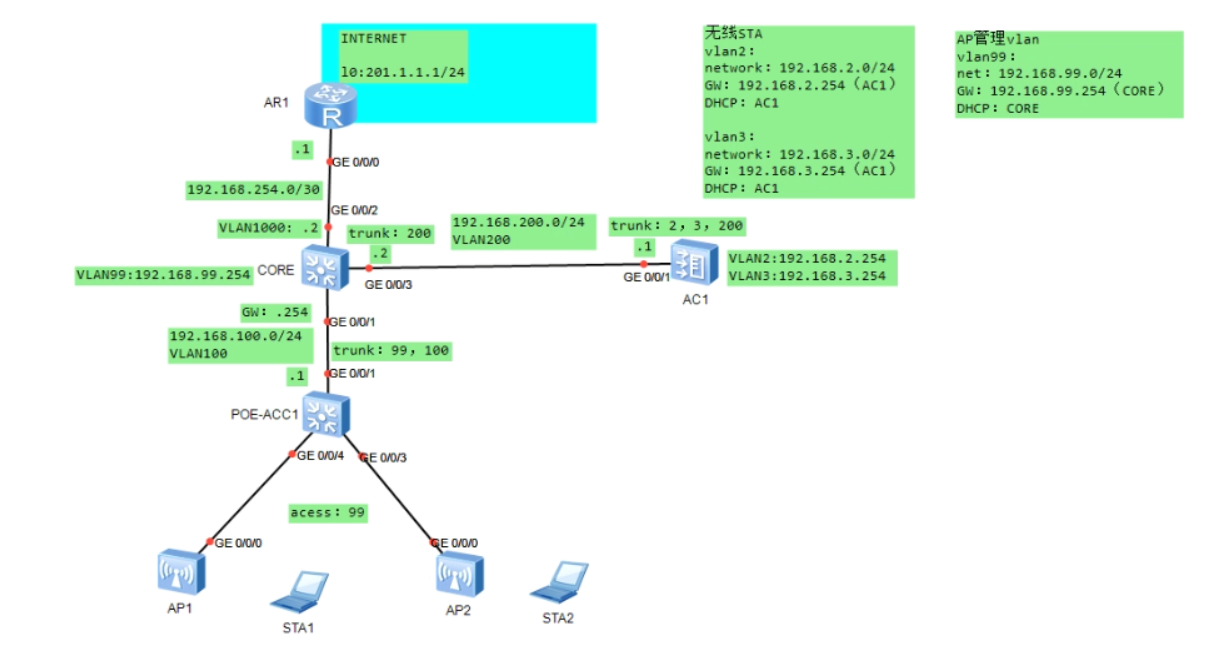
实验拓扑

1

基础配置

AR1

1
2
3
4
5
6
7
8
9
10
11
sysname AR1
interface GigabitEthernet0/0/0
ip address 192.168.254.1 255.255.255.252
interface LoopBack0
ip address 201.1.1.1 255.255.255.0
q
ip route-static 192.168.2.0 255.255.255.0 192.168.254.2
ip route-static 192.168.3.0 255.255.255.0 192.168.254.2
ip route-static 192.168.99.0 255.255.255.0 192.168.254.2
ip route-static 192.168.100.0 255.255.255.0 192.168.254.2
ip route-static 192.168.200.0 255.255.255.0 192.168.254.2

CORE

1
2
3
4
5
6
7
8
9
10
11
12
13
14
15
16
17
18
19
20
21
22
23
24
25
26
27
28
29
30
31
32
33
34
35
36
37
38
39
40
41
42
43
44
sysname CORE
vlan 99
description ap-vlan
vlan 100
description to-poe-acc1
vlan 200
description to-ac1
vlan 1000
description to-ar1

interface Vlanif99
ip address 192.168.99.254 255.255.255.0
interface Vlanif100
ip address 192.168.100.254 255.255.255.0
interface Vlanif200
ip address 192.168.200.2 255.255.255.0
interface Vlanif1000
ip address 192.168.254.2 255.255.255.252
q
interface GigabitEthernet0/0/1
port link-type trunk
port trunk allow-pass vlan 99 to 100

interface GigabitEthernet0/0/2
port link-type access
port default vlan 1000

interface GigabitEthernet0/0/3
port link-type trunk
port trunk allow-pass vlan 200
q
dhcp enable
interface Vlanif99
dhcp select global

ip pool manage-ap
gateway-list 192.168.99.254
network 192.168.99.0 mask 255.255.255.0
option 43 sub-option 3 ascii 192.168.200.1

q
ip route-static 0.0.0.0 0.0.0.0 192.168.254.1
ip route-static 192.168.2.0 255.255.255.0 192.168.200.1
ip route-static 192.168.3.0 255.255.255.0 192.168.200.1

AC1

1
2
3
4
5
6
7
8
9
10
11
12
13
14
15
16
17
18
19
20
21
22
23
24
25
26
27
28
29
30
sysname AC1
vlan 2
description sta-vlan2
vlan 3
description sta-vlan3
vlan 200
description to-core

interface Vlanif2
ip address 192.168.2.254 255.255.255.0
dhcp select global
interface Vlanif3
ip address 192.168.3.254 255.255.255.0
dhcp select global
interface Vlanif200
ip address 192.168.200.1 255.255.255.0

interface GigabitEthernet0/0/1
port link-type trunk
port trunk allow-pass vlan 2 to 3 200

dhcp enable
ip pool sta-vlan2
gateway-list 192.168.2.254
network 192.168.2.0 mask 255.255.255.0
ip pool sta-vlan3
gateway-list 192.168.3.254
network 192.168.3.0 mask 255.255.255.0

ip route-static 0.0.0.0 0.0.0.0 192.168.200.2

POC-ACC1

1
2
3
4
5
6
7
8
9
10
11
12
13
14
15
sysname POE-ACC1
vlan batch 99 to 100
interface Vlanif100
ip address 192.168.100.1 255.255.255.0

interface GigabitEthernet0/0/1
port link-type trunk
port trunk allow-pass vlan 99 to 100

port-group 1
group-member GigabitEthernet 0/0/3 to GigabitEthernet 0/0/4
port link-type access
port default vlan 99

ip route-static 0.0.0.0 0.0.0.0 192.168.100.254

核心配置

AC1

1
2
3
4
5
6
7
8
9
10
11
12
13
14
15
16
17
18
19
20
21
22
23
24
25
26
27
28
29
30
31
32
33
34
# CAPWAP配置:指定源接口
capwap source interface Vlanif200

# ap上线
wlan
ap-group name rjdl #创建一个rjdl组
ap auth-mode mac-auth # AP按MAC认证
ap-id 1 ap-mac 00e0-fc2f-7a60 # 注册AP1
ap-group rjdl #将AP1加入rjdl组
ap-id 2 ap-mac 00e0-fc21-7200 # 注册AP2
ap-group rjdl
q
ssid-profile name guest # 创建ssid模板
ssid guest # 设置wifi名称
q
ssid-profile name net24
ssid net24
q
security-profile name wpa2 # 创建安全模板
security wpa2 psk pass-phrase 12345678 aes # 设置密码
q
vap-profile name guest # 创建VAP模板
forward-mode tunnel #数据转发模式为 “隧道模式”
service-vlan vlan-id 3 #绑定vlan
ssid-profile guest # 绑定SSID
vap-profile name net24
forward-mode tunnel
service-vlan vlan-id 2
ssid-profile net24
security-profile wpa2 #绑定安全模板
q
ap-group name rjdl # 将VAP下发到组内AP
vap-profile guest wlan 1 radio all
vap-profile net24 wlan 2 radio all

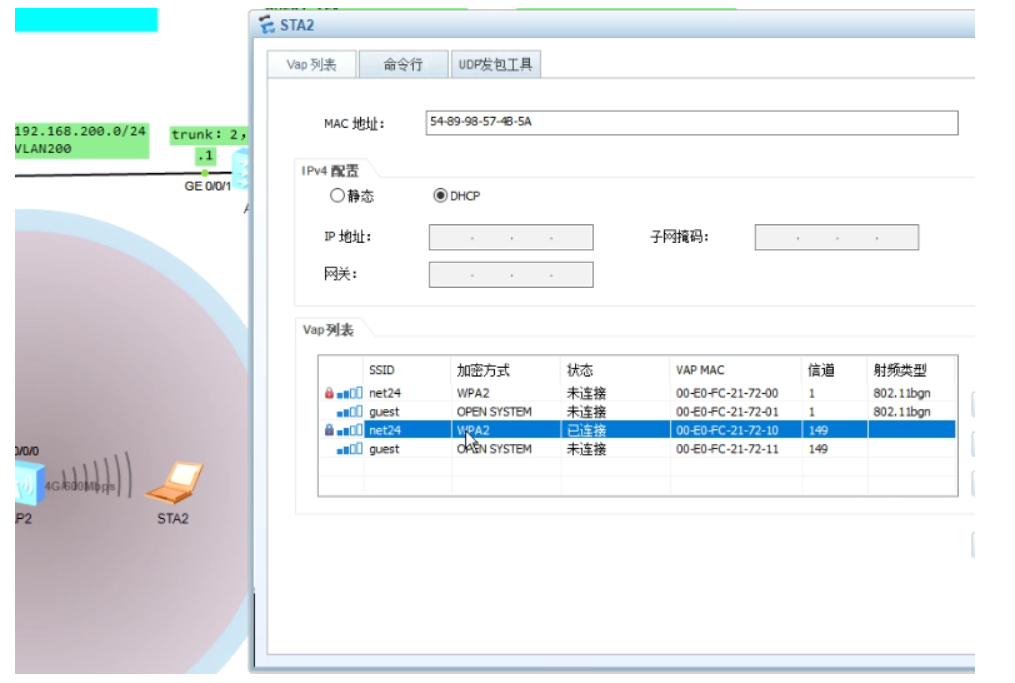
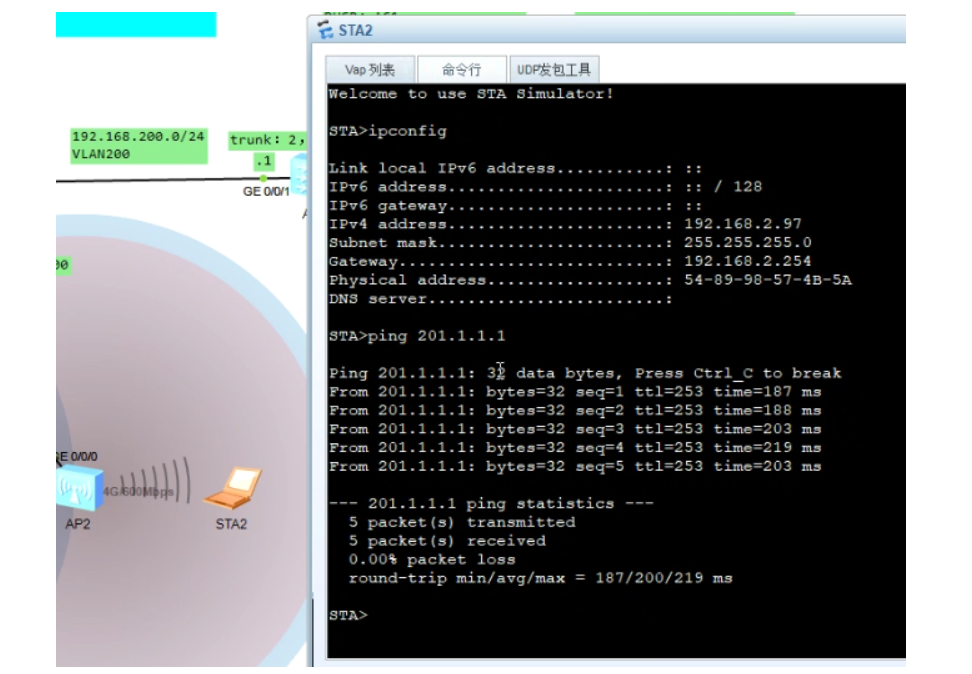
测试

2

3


WLAN集中式转发
https://netguy6.github.io/2026/02/05/WLAN集中式转发/
作者
net06
发布于
2026年2月5日
许可协议