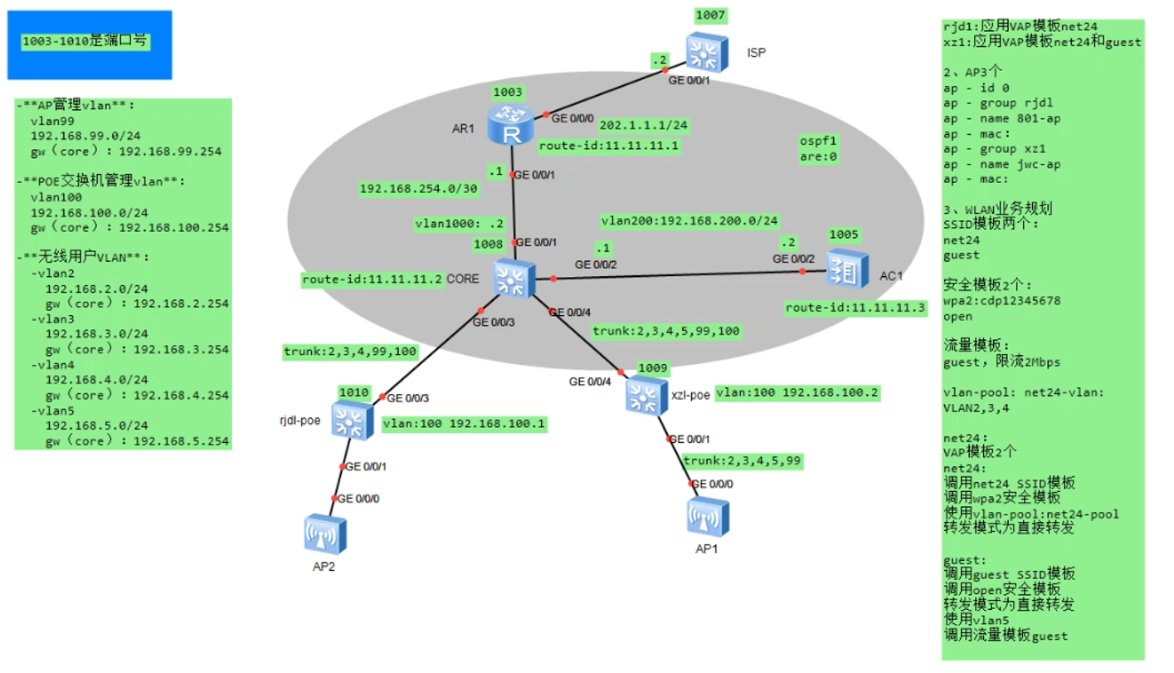
三层旁挂直接转发WLAN

拓扑图

image-20251015175258105

配置过程

AR1

1
2
3
4
5
6
7
8
9
10
11
12
13
14
sysname AR1
# 连接CORE的接口(GE0/0/1)
interface GigabitEthernet0/0/1
ip address 192.168.254.1 255.255.255.252
# 连接ISP的接口(GE0/0/0)
interface GigabitEthernet0/0/0
ip address 202.1.1.1 255.255.255.0
# OSPF路由:宣告外网和内网互联网段
ospf 1 router-id 11.11.11.1
area 0.0.0.0
network 192.168.254.0 0.0.0.3

# 默认路由:指向ISP网关
ip route-static 0.0.0.0 0.0.0.0 202.1.1.2

ISP

1
2
3
4
5
6
sysname ISP
# 连接AR1的接口(GE0/0/1)
interface GigabitEthernet0/0/0
ip address 202.1.1.2 255.255.255.0
# 默认路由:指向AR1网关
ip route-static 0.0.0.0 0.0.0.0 202.1.1.1

CORE

1. VLAN与三层接口

1
2
3
4
5
6
7
8
9
10
11
12
13
14
15
16
17
18
19
20
21
22
23
24
25
sysname CORE
vlan batch 99 2 3 4 5 200 100 1000 # 创建AP管理、用户、互联VLAN
# AP管理网关(VLAN99)
interface Vlanif99
ip address 192.168.99.254 255.255.255.0
dhcp select global # 为AP分配管理IP
# 用户网关(VLAN2/3/4/5)
interface Vlanif2
ip address 192.168.2.254 255.255.255.0
dhcp select global
interface Vlanif3
ip address 192.168.3.254 255.255.255.0
dhcp select global
interface Vlanif4
ip address 192.168.4.254 255.255.255.0
dhcp select global
interface Vlanif5
ip address 192.168.5.254 255.255.255.0
dhcp select global
# 与AC互联(VLAN200)
interface Vlanif200
ip address 192.168.200.1 255.255.255.0
# 与AR1互联(VLAN1000)
interface Vlanif1000
ip address 192.168.254.2 255.255.255.252

2. 接口Trunk配置(连接AC、接入交换机、AR1)

1
2
3
4
5
6
7
8
9
10
11
12
13
14
15
16
dhcp enable
# 连接AR1(GE0/0/1)
interface GigabitEthernet0/0/1
port link-type access
port default vlan 1000
# 连接AC1(GE0/0/2)
interface GigabitEthernet0/0/2
port link-type access
port default vlan 200
# 连接接入交换机(GE0/0/3、GE0/0/4)
interface GigabitEthernet0/0/3
port link-type trunk
port trunk allow-pass vlan 99 2 3 4 100
interface GigabitEthernet0/0/4
port link-type trunk
port trunk allow-pass vlan 99 2 3 4 5 100

3. DHCP地址池(为AP和用户分配IP)

1
2
3
4
5
6
7
8
9
10
11
12
13
14
15
16
17
18
19
20
21
22
23
dhcp enable
# AP管理IP池(VLAN99)
ip pool AP_Mgmt
gateway-list 192.168.99.254
network 192.168.99.0 mask 255.255.255.0
option 43 sub-option 3 ascii 192.168.200.2
# 用户IP池(VLAN2/3/4/5)
ip pool STA_VLAN2
gateway-list 192.168.2.254
network 192.168.2.0 mask 255.255.255.0
dns-list 8.8.8.8 114.114.114.114
ip pool STA_VLAN3
gateway-list 192.168.3.254
network 192.168.3.0 mask 255.255.255.0
dns-list 8.8.8.8 114.114.114.114
ip pool STA_VLAN4
gateway-list 192.168.4.254
network 192.168.4.0 mask 255.255.255.0
dns-list 8.8.8.8 114.114.114.114
ip pool STA_VLAN5
gateway-list 192.168.5.254
network 192.168.5.0 mask 255.255.255.0
dns-list 8.8.8.8 114.114.114.114

4. OSPF路由(与AC、AR1互联)

1
2
3
4
5
6
7
8
9
10
ospf 1 router-id 11.11.11.2
default-route-advertise always
area 0.0.0.0
network 192.168.99.0 0.0.0.255
network 192.168.2.0 0.0.0.255
network 192.168.3.0 0.0.0.255
network 192.168.4.0 0.0.0.255
network 192.168.5.0 0.0.0.255
network 192.168.200.0 0.0.0.255
network 192.168.254.0 0.0.0.3

xzl\rjdl-poe

1
2
3
4
5
6
7
8
9
10
11
12
13
14
15
16
17
18
19
20
21
22
23
24
25
26
27
28
29
30
31
32
33
sysname xjdl-poe
vlan batch 99 2 3 4 100
# 管理VLAN100(与CORE互联)
interface Vlanif100
ip address 192.168.100.1 255.255.255.0
# 连接CORE的接口(GE0/0/3)
interface GigabitEthernet0/0/3
port link-type trunk
port trunk allow-pass vlan 99 2 3 4 100
# 连接AP的接口(GE0/0/1)
interface GigabitEthernet0/0/1
port link-type trunk
port trunk pvid vlan 99
port trunk allow-pass vlan 99 2 3 4
#设置网关
ip route-static 0.0.0.0 0.0.0.0 192.168.100.254

sysname xzl-poe
vlan batch 99 2 3 4 5 100
# 管理VLAN100(与CORE互联)
interface Vlanif100
ip address 192.168.100.2 255.255.255.0
# 连接CORE的接口(GE0/0/4)
interface GigabitEthernet0/0/4
port link-type trunk
port trunk allow-pass vlan 99 2 3 4 5 100
# 连接AP的接口(GE0/0/1)
interface GigabitEthernet0/0/1
port link-type trunk
port trunk pvid vlan 99
port trunk allow-pass vlan 99 2 3 4 5
#设置网关
ip route-static 0.0.0.0 0.0.0.0 192.168.100.254

AC1

1. 基础网络与CAPWAP

1
2
3
4
5
6
7
8
9
10
11
12
13
14
15
sysname AC1
vlan 200
# 与CORE互联(VLAN200)
interface Vlanif200
ip address 192.168.200.2 255.255.255.0
# 连接CORE的接口(GE0/0/1)
interface GigabitEthernet0/0/2
port link-type access
port default vlan 200
# 指定CAPWAP源接口(仅传管理流量)
capwap source interface Vlanif200
#ospf
ospf 1 router-id 11.11.11.3
area 0.0.0.0
network 192.168.200.0 0.0.0.255

2. WLAN业务模板(SSID、安全、VAP)

1
2
3
4
5
6
7
8
9
10
11
12
13
14
15
16
17
18
19
20
21
22
23
24
25
26
27
28
29
30
31
32
33
34
35
36
wlan
# (1)SSID模板:定义WiFi名称
ssid-profile name net24
ssid net24
ssid-profile name guest
ssid guest

# (2)安全模板:定义加密方式
security-profile name wpa2
security wpa2 psk pass-phrase wpa2@123 aes # 员工WiFi密码
security-profile name open
security open # 访客WiFi无密码(或 Portal 认证)

# (3)流量模板:访客限速2Mbps
traffic-profile name guest
rate-limit down 2048 # 下行2Mbps
rate-limit up 2048 # 上行2Mbps

# (4)VLAN池:员工WiFi动态分配VLAN2/3/4
vlan pool net24-vlan
vlan 2 3 4

# (5)VAP模板:绑定SSID、安全、转发模式
## 员工WiFi(net24):直接转发+VLAN池
vap-profile name net24
ssid-profile net24
security-profile wpa2
service-vlan vlan-pool net24-vlan
forward-mode direct # 业务流量不经过AC,直接由AP转发
## 访客WiFi(guest):直接转发+固定VLAN5+流量限速
vap-profile name guest
ssid-profile guest
security-profile open
service-vlan vlan-id 5
forward-mode direct
traffic-profile guest

3. AP注册与VAP下发

1
2
3
4
5
6
7
8
9
10
11
12
13
14
15
16
17
18
# AP按MAC认证上线
ap auth-mode mac-auth
#创建组
ap-group name rjdl
ap-group name xzl
# 注册AP(替换为实际MAC)
ap-id 0 ap-mac 00e0-fcbb-1b70 # 801-ap
ap-name 801-ap
ap-group rjdl
ap-id 1 ap-mac 00e0-fa9e-3e20 # jwc-ap
ap-name jwc-ap
ap-group xzl
#下发配置
ap-group name rjdl
vap-profile net24 wlan 1 radio all
ap-group name xzl
vap-profile net24 wlan 1 radio all
vap-profile guest wlan 2 radio all

三层旁挂直接转发WLAN
https://netguy6.github.io/2026/02/05/三层旁挂直接转发WLAN/
作者
net06
发布于
2026年2月5日
许可协议